-
Gujarat, India
- info@icontechnology.in
- 24/7 Customer Support
Gujarat, India
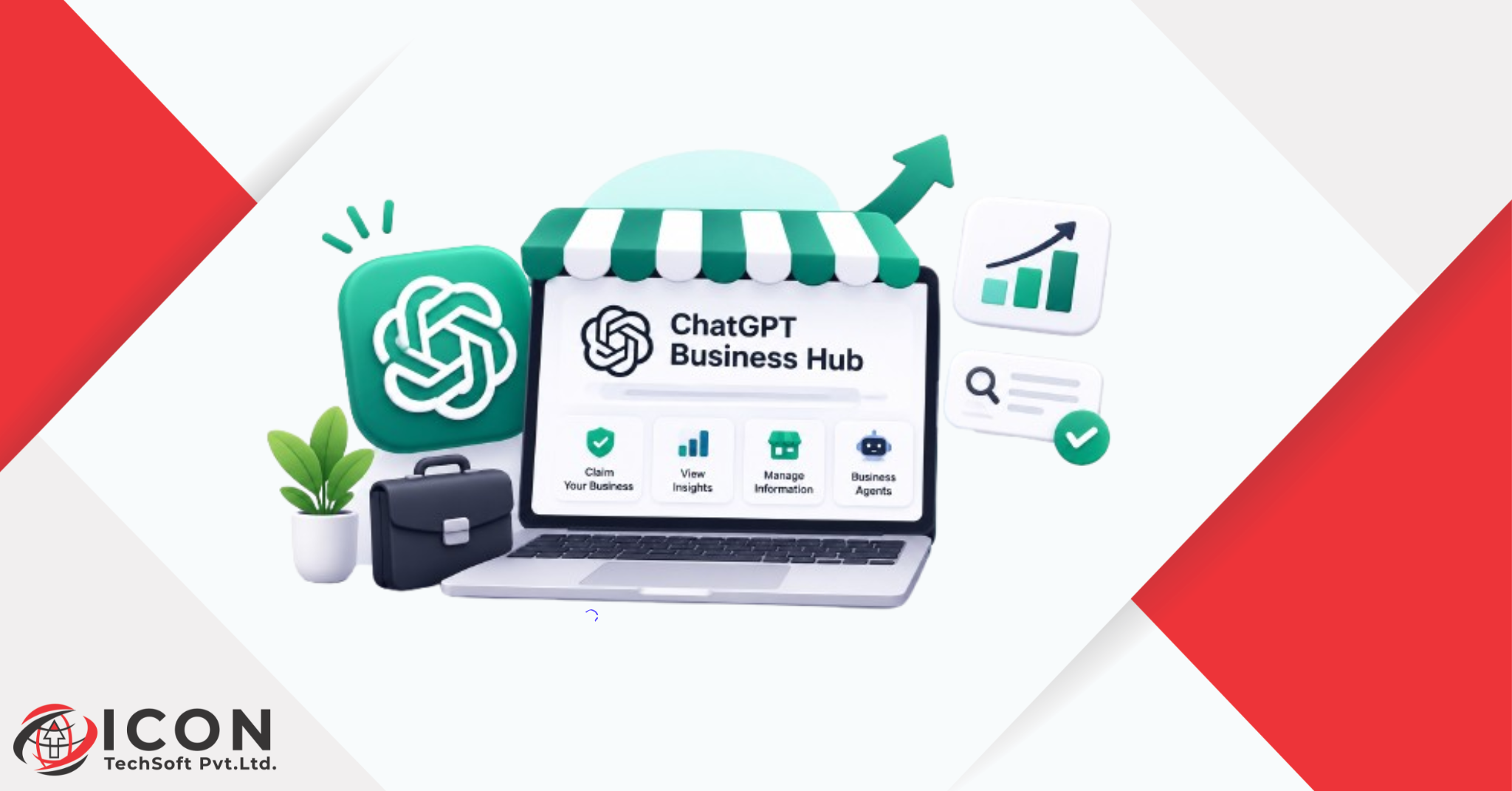
People are changing the way they look for products and services. A few years ago, most people typed a short phrase into a search engine and clicked through a list of blue links. Today, many of them open ChatGPT and simply ask a question. They say things like “Which agency can build my online store?” or “Where can I find a good salon near me?” and expect a clear answer right away.
This shift is the reason the ChatGPT Business Hub matters. OpenAI launched Businesses in ChatGPT in beta on November 10, 2026, and Business Hub is the place where business owners can take part. According to OpenAI, ChatGPT is used by about 1.2 billion people every week. That is a huge audience, and a growing share of it is asking for recommendations, not just facts.
If you own or manage a business, you may be wondering what this means for you, and how to list business on ChatGPT in the first place. Will ChatGPT mention your brand? Is the information it shows correct? Can you control any of it? The ChatGPT Business Hub is OpenAI’s first real answer to these questions. It lets eligible businesses claim their profile, keep their details fresh, and see how people interact with them.
In this guide, we will explain what the ChatGPT Business Hub is, how business discovery works inside ChatGPT, how to claim your profile, and what you can do to improve your AI search visibility. We will also be honest about the limits, because this is a beta product and some things are still changing.
AI search is different from traditional search in one big way. Instead of giving you ten options to compare, it gives you one combined answer. The user may never visit a results page at all. This means your business has fewer chances to be seen, and the chances it does get are worth more.
That is why AI search visibility is quickly becoming a real marketing goal. If an AI assistant understands your business well, it can mention you at the right moment. If it has old, thin, or conflicting information about you, it may skip you or describe you wrongly.
Businesses in ChatGPT is the name OpenAI uses for this new feature, and businesses in ChatGPT can now be managed from one place. It gives companies a structured way to share facts with ChatGPT, such as their details, products, pricing, and availability. Before this, ChatGPT had to guess from whatever it could find on the open web. Now a verified owner can give it cleaner information.
This changes online discovery in a simple way. Visibility is no longer only about ranking on a page. It is also about being clearly understood by an AI system.
For a small shop, an agency, or a growing software company, the ChatGPT Business Hub offers three things that were hard to get before. You get a place to manage how you appear. You get some data on how people engage with your business. And you get an early start while most competitors have not even opened the dashboard.
Early movers often benefit the most with new platforms. That was true for Google Business Profile, and it may well be true here.
The ChatGPT Business Hub is a section inside ChatGPT, reached from the sidebar, made for companies. In it, a business can claim its listing, add business details and product information, and view insights about how people engage with it. You do not need a ChatGPT Enterprise contract or an ads account to claim an eligible business, and OpenAI’s help pages do not list a fee for claiming a profile.
Businesses in ChatGPT is the wider feature. It is the idea that when someone asks ChatGPT about a company, product, or service, the answer can include a proper business profile instead of a loose summary pulled from random pages. The hub is the control panel that sits behind it.
An important point to remember is that ChatGPT can show information about a business even if nobody has claimed it. OpenAI’s terms allow it to create and keep a listing using the data it already has. Claiming does not create your presence. It gives you a say in it.
A ChatGPT business profile is the page of information that ChatGPT holds about your business. Once you claim and verify it, you can update key details. Eligible businesses can also add a product feed with pricing and availability, so ChatGPT can talk about what you actually sell in a more accurate way.
Think of it as a fact sheet for an AI. The cleaner and more complete it is, the easier it is for the AI to describe you correctly.
The basic flow is simple:
Verification depends on the business. Depending on the case, OpenAI can check a claim through a business phone number, an email address, a website domain, or a Shopify account. After the claim is approved, the person managing it also completes a separate identity check through Persona before publishing changes or seeing analytics.
AI business discovery is the process of an AI assistant finding, understanding, and recommending businesses in response to a question. The goal of the ChatGPT Business Hub is to make that process more accurate. For users, it means better answers. For businesses, it means a fairer chance of being represented correctly.
To get the most out of this feature, it helps to understand how people actually use ChatGPT to find businesses.
Customers do not search in keywords. They talk. A person might type, “I need a team that can set up Odoo for my small company in Australia,” or “Suggest a bakery that does custom cakes.” ChatGPT reads the full meaning of the question and tries to match it with businesses it knows about.
This is why how businesses appear in ChatGPT depends so much on clarity. Many owners ask how businesses appear in ChatGPT, and the honest answer is that it depends on how clear and consistent their information is. The AI needs to know what you do, who you serve, and where you operate. If those three things are easy to find, you are easier to recommend.
When a business profile is relevant to a question, ChatGPT can show information about that business as part of its answer. It may include details like what the business offers, its website, and other facts it considers useful. The exact look may change as the beta grows, so it is smart not to build your whole plan around one layout.
One thing OpenAI states clearly is that claiming a profile or disputing ownership does not change its visibility in ChatGPT. So the profile is not a shortcut to the top. It is a way to make sure that when you are shown, the facts are right.
AI systems lean on information they can trust. When your website, your profile, your social pages, and your directory listings all say the same thing, the AI has more confidence in you. When they disagree, the AI faces conflicting signals and may leave you out.
That is why AI search visibility is not only a technical job. It is also a data cleanliness job. Names, addresses, phone numbers, service descriptions, and opening hours should match everywhere.
Local discovery in ChatGPT is still limited. Right now, local stores and restaurants can claim only an existing listing in the United States. If you run a local business outside the US, you may not be able to claim a profile yet. We will cover this in more detail in the limitations section, so you can plan with realistic expectations.
The hub is still in beta, but it already has a clear set of tools.
This is the starting point. You find your listing, confirm which ChatGPT account will manage it, and complete verification. If you see a message saying “Contact support,” it means the listing is locked, and you will need to request access through support.
A good tip is to use a company account instead of a personal one. If an employee leaves, you do not want to lose control of your profile.
Once approved, you can manage the information ChatGPT holds about you. This includes your business details and how you describe what you do. Keep this written in plain language, because that is the language the AI works with best.
For eligible businesses, the ChatGPT Business Hub supports self-service product feeds with pricing and availability. Shopify merchants can connect their store from the ChatGPT Business Hub or from the Shopify admin, which makes verification easier. If you sell products, keeping the feed current helps avoid wrong prices or out-of-stock items showing up in answers.
Service businesses should do the same thing in a different form. Keep your service list, your pricing approach, and your areas of work up to date.
After your claim and identity check are approved, you can open the Insights section for your business. This shows how people engage with you, including mentions and website clicks. A website click is the clearest sign that someone moved beyond reading an answer and decided to learn more.
These numbers are early and limited, but they give you something you never had before: a view into how an AI assistant treats your brand.
Business Agents are an extra feature. A Business Agent is a custom AI helper that can talk to customers on behalf of your company. At launch, reports say eligible businesses can publish one for free, but availability is limited and, according to current reports, agents are for US businesses first. Check OpenAI’s help pages before you plan around this, as the rules may change.
If you are still unsure how to list business on ChatGPT, here is the process in simple steps. Learning how to list business on ChatGPT takes only a few minutes if your details are ready. Please remember that it can change as the beta develops.
Sign in to your ChatGPT account and open the ChatGPT Business Hub from the sidebar. Some guides also mention the direct address chatgpt.com/business-hub. You can open it even with a free ChatGPT account.
Before you spend time, check whether you qualify:
Search for your business by name. Choose the listing that matches. If you cannot find one and you manage an eligible online business, you may see an option to add a listing.
Pick the verification method you can finish fastest. This might be a business phone number, an email address, a DNS record on your domain, or a Shopify connection. If you control your domain, the DNS route is often the quickest for technical teams.
You must own the business or be authorized to represent it. After approval, complete the Persona identity check. One useful tip: finish that check only when your profile information is ready, since a new profile created this way can publish once approved.
Now fill in your details. Use the same business name, website, phone number, and address that appear on your website and other listings. Consistency is the whole point. Then add products or services and check the insights from time to time.
For businesses in ChatGPT, a verified profile gives the AI better source facts. That does not guarantee a mention, but it does reduce the chance of wrong or outdated information. For AI business discovery, accuracy is the first step.
Visibility here means being understood, not just being listed. A complete ChatGPT business profile gives the system more to work with. When your information is rich and clear, you give the AI more reasons to include you when a question fits.
With about 1.2 billion weekly users, even a tiny share of questions about your industry can send real people to your site. Those visitors often arrive with a clear need, because they have already asked a detailed question.
Wrong opening hours, old prices, or a missing service can frustrate a customer before they even contact you. By keeping your profile fresh, you remove that friction. Business Agents may also help answer simple questions faster, once they are available to you.
The hub also gives you data. Seeing mentions and clicks helps you learn which topics bring people to you. You can use this to guide your content, your services, and your marketing plan. Early insight is a real advantage, and it helps you get business discovered by AI before competitors catch on.
Many owners will ask whether this replaces their Google listing. It does not. The two tools do different jobs, and you will likely need both.
Google Business Profile controls how you appear on Google Search and Maps. It is built for people searching for places and services, and it has years of data behind it. The ChatGPT Business Hub focuses on how ChatGPT understands and presents your business inside a conversation.
Both let you claim a profile and edit details. Google’s tool is more mature and has more fields, photos, and posting options. The hub is newer and simpler. It is still growing, and features may be added over time.
Reviews have long been the heart of Google’s local ecosystem. The hub, as it stands, is more focused on mentions and website clicks than on a deep review system. If reviews matter to your trade, keep collecting them on the platforms where they count today.
Local search shows a list and lets the user choose. AI-powered recommendations give a shaped answer and often name fewer options. That makes clear positioning even more important in AI answers, because there may be only a couple of names in the response.
Also, the local side of the ChatGPT Business Hub is currently limited to US listings for stores and restaurants, while Google’s local tools work across many countries.
Google offers detailed data on searches, calls, and direction requests. The hub offers early insights into mentions and clicks. It is a smaller picture today, but it is the only window you have into ChatGPT specifically.
The best approach is simple. Keep your Google profile strong, claim your ChatGPT business profile where you can, and make sure both tell the same story.
Claiming a profile is only part of the job. If you want to optimize business for ChatGPT search, the steps below matter as much as the profile itself. To optimize business for ChatGPT search, you need to improve the whole picture that an AI sees. Here is what to focus on.
Start with the basics. Check your business name, address, phone number, email, hours, and service areas. If anything is old, fix it now. AI tools will repeat what they find, so errors spread fast.
Write like you are explaining your business to a new customer. Avoid vague words like “innovative solutions” or “world-class services.” Say what you do in plain terms. For example, an IT company could say: “We build websites, design user interfaces, and set up Odoo ERP and CRM for businesses in the US, UK, and Australia.”
That one sentence tells an AI the service, the audience, and the markets. It is much more useful than a slogan.
Think about the questions your customers ask. Then use those same words in your descriptions, service pages, and FAQs. Do not repeat phrases over and over. Natural writing works better with AI systems, which read for meaning and not just for exact matches.
Your website is still the main source of truth. Make it easy for both people and machines to understand:
Schema markup is a type of code that labels information on your page, so machines can read it easily. LocalBusiness schema tells search systems your business name, address, phone number, hours, and website in a standard format. It is not a magic switch, but it removes guesswork.
If you are not technical, ask your developer to add it. Just make sure the values in the schema match what you enter in the ChatGPT Business Hub.
This may be the most important step. Your website, your Google Business Profile, Bing Places, social accounts, and directory listings should all share the same details. If they disagree, AI systems face conflicting signals about who you are. Use one master document with your approved name, address, phone, and description, and copy from it everywhere.
Some people worry that AI search makes SEO useless. It does not. But it does change the way we should think about it.
Traditional SEO aims to rank pages in a list of results. It focuses on keywords, links, page speed, and content quality. AI search aims to produce one answer built from many sources. It focuses on meaning, trust, and clear facts.
Good SEO feeds AI search. Many AI systems learn from or retrieve content from the open web, so a well-built, trusted site helps both. If your pages are weak, a profile alone will not fix it. And if your profile is strong but your site is thin, the AI has little to back you up.
Treat them as one system. Both serve the same goal: to get business discovered by AI and by people. Strong SEO builds your base. The hub gives you a direct channel to share clean facts.
You may hear the term Generative Engine Optimization, or GEO. It means shaping your content and data so that AI engines can understand and use it. In practice, GEO looks a lot like good SEO with extra care: clear answers, trusted sources, consistent facts, and structured data. You do not need a separate strategy. You need a smarter version of the one you already have.
Local businesses in the US can claim an existing listing and keep their information correct. Outside the US, the local side is limited for now, but it is still worth getting your data ready.
Online stores gain the most from product feeds, pricing, and availability. Shopify merchants have an easier route, since they can connect from the ChatGPT Business Hub or the Shopify admin.
Places where customers want quick, practical answers, like menus, hours, and bookings, are a natural fit. Again, current claims are limited to existing US listings, so check your eligibility first.
Agencies can use the hub in two ways. They can claim their own profile to show up when companies ask for marketing help. They can also guide clients through the process and offer AI search visibility as a new service.
IT firms usually serve clients across countries and rely on being found for specific services, such as web development, UI/UX design, ERP, and CRM work. An online business with a website can claim a profile wherever ChatGPT is available, so this group has a strong chance to build early visibility.
Consultants, coaches, freelancers with registered businesses, and subscription services can all benefit. Clear service descriptions matter most here, since there is no storefront to point to.
It is important to be realistic. Business Hub is in beta, and not everything works for everyone yet.
You must own the business or be authorized to represent it, and you must pass verification and approval. Some listings may be locked, which means you must go through support. Identity verification through Persona is also required before you can publish changes, see analytics, or create an agent.
Eligible businesses can claim a profile in places where ChatGPT operates and where OpenAI supports the needed verification. This can differ by country, and rollouts may expand over time. Always check OpenAI’s current help page for your market.
Local stores and restaurants can currently claim only an existing US listing. Multi-location brands need to deal with each location separately, as claiming the main brand does not unlock the rest.
No. OpenAI says that claiming or disputing a profile does not change how visible it is in ChatGPT. A profile helps the AI get your facts right. It does not force the AI to recommend you. Think of it as a foundation, not a guarantee.
Before you claim, read the terms. Reports about the terms note that by using the hub you agree that OpenAI’s AI assistant may call your business on behalf of its users, and that you take on responsibility for claims related to your listing, data, and Business Agent. Have the right person in your company review these points. Also, since the product is in beta, expect features and rules to change.
People are getting used to asking and receiving one clean answer. As that habit grows, fewer of them will scroll through pages of results. They will trust the recommendation that the AI gives them. This makes the quality of your information a bigger part of your reputation.
Today the hub is new, and only a small number of businesses are using it. Over time, a ChatGPT business profile may become as normal as a Google listing. Businesses that already have clean data, active profiles, and a history of insights will be in a better position than those who start from zero.
AI search visibility is not a trend to wait out. Even if the details of today’s tools change, the main need stays the same. AI systems need clear, correct, consistent information about your business. Doing that work now helps you across ChatGPT and every other assistant that may appear later.
Expect more features over time, such as wider country support, deeper analytics, and more use of agents for bookings and customer questions. Businesses that learn how the system behaves early will adapt faster. Keep an eye on OpenAI’s announcements, and revisit your profile regularly.
The ChatGPT Business Hub is a practical first step into a new kind of discovery. It will not guarantee recommendations, and it is still a beta product with real limits, especially for local businesses outside the US. But it gives owners something valuable: a way to share correct information directly, and a way to see how people engage with their brand inside ChatGPT.
The path forward is simple, and Businesses in ChatGPT makes it easier than before. Check your eligibility. Claim and verify your profile. Keep your details accurate and the same on every platform. Write clear descriptions in plain English. Strengthen your website with good content and schema markup. And keep your normal SEO work going, because it supports everything else.
Businesses that get this right will be easier for people and for AI to find. If you want to get your business discovered by AI, the right time to start with the ChatGPT Business Hub is now, while the field is still wide open.