-
Gujarat, India
- info@icontechnology.in
- 24/7 Customer Support
Gujarat, India
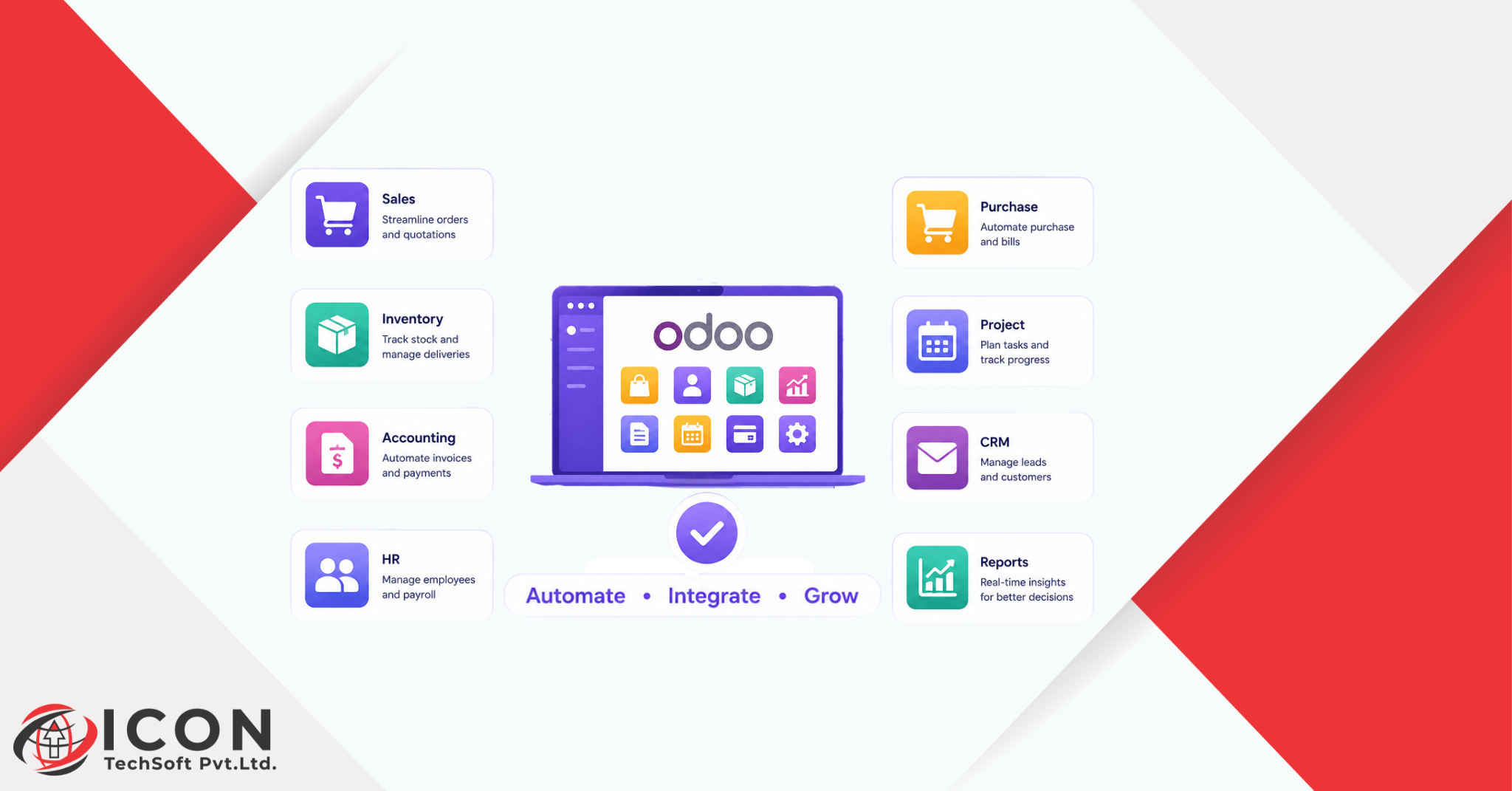
Odoo apps are helping Modern businesses are changing rapidly. Companies now need faster systems, better communication, and smarter tools to manage daily work. Manual processes that once worked well are now slowing businesses down. Tasks like data entry, inventory tracking, employee management, customer follow-ups, and accounting take a lot of time when handled manually.
This is why businesses are investing in automation tools. One of the most popular solutions today is Odoo apps. These applications help businesses simplify daily operations and improve efficiency through smart automation.
Businesses of all sizes now use CRM systems, ERP platforms, and Odoo modules to handle repetitive work. Instead of managing separate software for sales, accounting, HR, and inventory, companies can manage everything in one place.
Odoo apps help businesses automate daily operations by connecting departments and improving workflows. From lead generation to invoicing, every process becomes faster and more organized. This level of business workflow automation helps companies reduce errors, save time, and improve customer experience.
The demand for automation is growing strongly in 2026 because businesses want to stay competitive in a digital world. Companies that continue using manual systems often struggle with productivity and communication problems.
Odoo ERP solutions provide businesses with a centralized platform where teams can work together more efficiently. With different Odoo modules available, businesses can choose the exact features they need and scale the system as they grow.
Odoo apps are business applications designed to help companies manage and automate different operations from one platform. These applications are part of the Odoo ERP ecosystem, which includes tools for sales, CRM, accounting, HR, inventory, marketing, eCommerce, and project management.
Unlike traditional software that works separately, Odoo apps are connected with each other. This means information flows automatically between departments.
For example:
This connected workflow helps businesses automate business tasks without switching between multiple systems.
The Odoo ecosystem includes hundreds of Odoo modules that businesses can install based on their requirements. Companies can start with basic modules and add more features later.
Some popular Odoo modules include:
This flexibility makes Odoo ERP highly customizable for different industries.
Traditional software often works independently. Businesses may use one tool for accounting, another for CRM, and another for inventory management. This creates data duplication and communication gaps.
Odoo ERP connects all departments into one unified system. Teams can access real-time information without manually updating records.
Businesses choose Odoo apps because they offer:
These benefits make Odoo apps a strong choice for modern businesses.
Automation is no longer optional for businesses in 2026. Companies must improve efficiency to compete in fast-moving markets.
Manual processes create several problems:
Businesses that rely heavily on spreadsheets and paperwork often struggle to scale operations.
Employees waste valuable time performing repetitive activities such as:
With Odoo apps, these tasks become automated.
Manual data entry increases the risk of mistakes. Incorrect invoices, inventory mismatches, and accounting errors can damage business performance.
ERP systems reduce these issues by automating workflows and synchronizing data.
When departments use disconnected software, communication becomes difficult. Teams cannot access real-time updates.
Business workflow automation solves this problem by connecting all operations into one platform.
Businesses today need:
Odoo ERP solutions help companies achieve these goals through automation.
Sales teams handle many repetitive tasks every day. Odoo apps automate these activities to improve productivity.
Managing Leads and Opportunities Automatically
Odoo CRM automatically captures leads from websites, emails, and campaigns. Sales teams can track opportunities more efficiently.
Sales Pipeline Tracking with CRM
The CRM dashboard helps businesses monitor the sales pipeline in real time.
Automated Quotations and Invoicing
Sales quotations and invoices can be generated automatically using Odoo modules.
Customer Follow-Up Reminders
Automated reminders ensure sales representatives never miss important follow-ups.
CRM plays a major role in customer management.
Centralized Customer Data Management
All customer information is stored in one place.
Lead Scoring and Sales Forecasting
Odoo CRM helps businesses identify high-value leads.
Automated Email and Communication Tracking
Businesses can automate customer emails and track conversations easily.
Improving Customer Experience with CRM Workflows
Better communication improves customer satisfaction and loyalty.
Inventory management becomes much easier with Odoo apps.
Real-Time Stock Tracking
Businesses can monitor stock availability instantly.
Automated Inventory Updates
Inventory levels update automatically after sales and purchases.
Smart Warehouse Management
Warehouse teams can manage storage locations efficiently.
Purchase Order Automation
The ERP system automatically creates purchase orders when stock levels are low.
Accounting tasks often consume significant business time.
Automated Bookkeeping and Invoicing
Odoo Accounting automates invoices and financial entries.
Expense Tracking and Tax Management
Businesses can manage taxes and expenses more accurately.
Financial Reporting Automation
Reports are generated automatically in real time.
Reducing Accounting Errors with ERP Systems
Automation reduces human mistakes in accounting processes.
HR departments also benefit from automation.
Employee Attendance and Leave Management
Employee attendance tracking becomes simple and accurate.
Payroll Automation
Payroll calculations are automated through Odoo HR modules.
Recruitment Workflow Automation
Recruitment processes become faster and more organized.
Employee Performance Tracking
Managers can track employee performance through dashboards.
Project management becomes more efficient with Odoo ERP tools.
Task Assignment and Progress Tracking
Managers can assign tasks and monitor progress easily.
Team Collaboration Features
Employees collaborate better through centralized communication.
Deadline Reminders and Workflow Updates
Automatic notifications help teams stay on schedule.
Resource Planning Automation
Businesses can allocate resources efficiently.
Marketing teams use automation to improve campaigns.
Email Marketing Automation
Businesses can schedule and automate email campaigns.
Customer Segmentation
Odoo apps segment customers based on behavior and interests.
Campaign Performance Tracking
Teams can analyze marketing performance in real time.
Lead Nurturing Workflows
Automated workflows help convert leads into customers.
eCommerce businesses require fast and accurate systems.
Automated Order Management
Orders sync automatically with inventory and accounting.
Website Integration with ERP
Odoo ERP integrates websites with backend operations.
Customer Self-Service Portals
Customers can track orders and manage accounts online.
Real-Time Product and Inventory Sync
Product information updates instantly across channels.
Businesses gain many advantages through automation.
Saves Time and Operational Costs
Automation reduces manual work and increases efficiency.
Improves Productivity and Efficiency
Employees can focus on high-value tasks instead of repetitive work.
Reduces Manual Errors
Automated systems improve accuracy.
Better Decision-Making Through Real-Time Data
Managers can access reports instantly.
Enhances Customer Experience
Faster responses improve customer satisfaction.
Scalable for Growing Businesses
Businesses can add more Odoo modules as they grow.
Easy Integration Between Departments
All teams work together on one platform.
Odoo ERP offers flexible customization options.
Traditional software often requires multiple licenses. Odoo ERP reduces overall costs.
Odoo modules integrate smoothly with each other.
The system is easy for employees to use.
Businesses prefer Odoo ERP because it simplifies operations and improves workflow automation.
Retailers automate sales, inventory, and billing processes.
Manufacturers manage production and supply chains efficiently.
Online stores automate order management and customer support.
Healthcare organizations manage appointments and patient records.
Schools automate student records and fee management.
Service businesses improve project management and communication.
Small businesses scale operations using affordable ERP systems.
Odoo CRM
Manages leads, customers, and sales pipelines.
Odoo Sales
Automates quotations and order management.
Odoo Inventory
Tracks inventory and warehouse operations.
Odoo Accounting
Simplifies bookkeeping and financial reporting.
Odoo HR
Handles employee records and payroll.
Odoo Project Management
Improves project tracking and collaboration.
Odoo eCommerce
Integrates websites with ERP operations.
Odoo Marketing Automation
Automates campaigns and customer engagement.
Businesses face many operational challenges.
Poor Communication Between Departments
Connected workflows improve communication.
Delayed Reporting and Decision-Making
Real-time dashboards speed up decisions.
Inventory Mismanagement
Automation reduces stock issues.
Lost Sales Opportunities
CRM systems help businesses track leads effectively.
Manual Accounting Errors
ERP systems improve financial accuracy.
Unorganized Workflow Processes
Business workflow automation creates structured operations.
Understanding Business Requirements
Businesses should identify operational challenges first.
Selecting Modules Based on Business Size
Small businesses may need fewer modules initially.
Importance of Scalability
Choose modules that support future growth.
Customization and Integration Needs
Businesses should evaluate customization requirements carefully.
Working with an Experienced Odoo Implementation Partner
Professional guidance ensures successful implementation.
Business Analysis and Planning
Analyze workflows and define automation goals.
Choosing the Right Modules
Select relevant Odoo modules for operations.
Data Migration Process
Transfer business data carefully into the ERP system.
Employee Training and Onboarding
Train employees properly for smooth adoption.
Testing and Deployment
Test workflows before full implementation.
Ongoing Support and Optimization
Regular updates improve system performance.
Technology continues to evolve rapidly.
AI-Powered Automation Trends
Artificial intelligence improves workflow automation.
Smart Workflows and Predictive Analytics
Businesses can predict trends and customer behavior.
Cloud-Based ERP Systems
Cloud ERP solutions provide better accessibility.
Future of CRM and ERP Integration
CRM and ERP systems will become even more connected.
How Automation Will Reshape Businesses in the Coming Years
Automation will improve productivity, efficiency, and decision-making across industries.
A retail company managed inventory manually using spreadsheets. Sales teams used separate CRM software while accounting worked independently.
This created:
After implementing Odoo ERP:
The company reduced operational costs and improved productivity significantly.
Choosing Too Many Modules Initially
Businesses should start with essential modules first.
Lack of Employee Training
Proper training is necessary for successful adoption.
Ignoring Workflow Planning
Businesses should plan workflows before automation.
Poor Data Migration Strategies
Incorrect migration can create system issues.
Not Updating Systems Regularly
Regular updates improve security and functionality.
Odoo apps are transforming how businesses manage daily operations in 2026. Companies now rely on CRM systems, ERP platforms, and smart Odoo modules to automate repetitive tasks and improve efficiency.
From sales and inventory management to accounting and HR operations, Odoo ERP solutions help businesses automate business tasks through connected workflows and real-time data management.
Business workflow automation is becoming essential for companies that want to reduce costs, improve productivity, and deliver better customer experiences. Businesses that continue using manual systems may struggle to compete in modern markets.
Odoo apps provide flexibility, scalability, and integration that help organizations grow efficiently. Whether it is a startup, retail business, manufacturing company, or eCommerce brand, automation can improve every department.
As technology continues to evolve, businesses that adopt Odoo ERP and automation solutions early will gain a strong competitive advantage in the future.
What are Odoo apps used for?
A. Odoo apps are used to manage and automate business operations such as sales, CRM, accounting, HR, inventory, marketing, and eCommerce.
How do Odoo apps help automate daily business operations?
A. Odoo apps automate repetitive tasks, connect departments, and provide real-time business data to improve efficiency.
What is the difference between Odoo ERP and traditional business software?
A. Odoo ERP integrates all business processes into one system, while traditional software usually works separately.
Which Odoo modules are best for business automation?
A. Popular Odoo modules include Odoo CRM, Odoo Inventory, Odoo Accounting, Odoo HR, and Odoo Marketing Automation.
How does Odoo CRM improve customer management?
A. Odoo CRM helps businesses manage leads, customer communication, sales pipelines, and follow-up activities.
Can small businesses use Odoo ERP solutions?
A. Yes, Odoo ERP solutions are scalable and suitable for startups, SMEs, and large enterprises.
How does business workflow automation improve productivity?
A. Automation reduces manual work, improves communication, and speeds up daily operations.
Can Odoo integrate with eCommerce websites and other tools?
A. Yes, Odoo integrates with websites, payment gateways, third-party applications, and business tools.
Is Odoo customizable for different business needs?
A. Yes, businesses can customize Odoo modules according to their industry and operational requirements.
Why are businesses adopting Odoo apps for automation in 2026?
A. Businesses are adopting Odoo apps to improve efficiency, reduce operational costs, automate workflows, and stay competitive in the digital market.