
-
Gujarat, India
- info@icontechnology.in
- 24/7 Customer Support
Gujarat, India
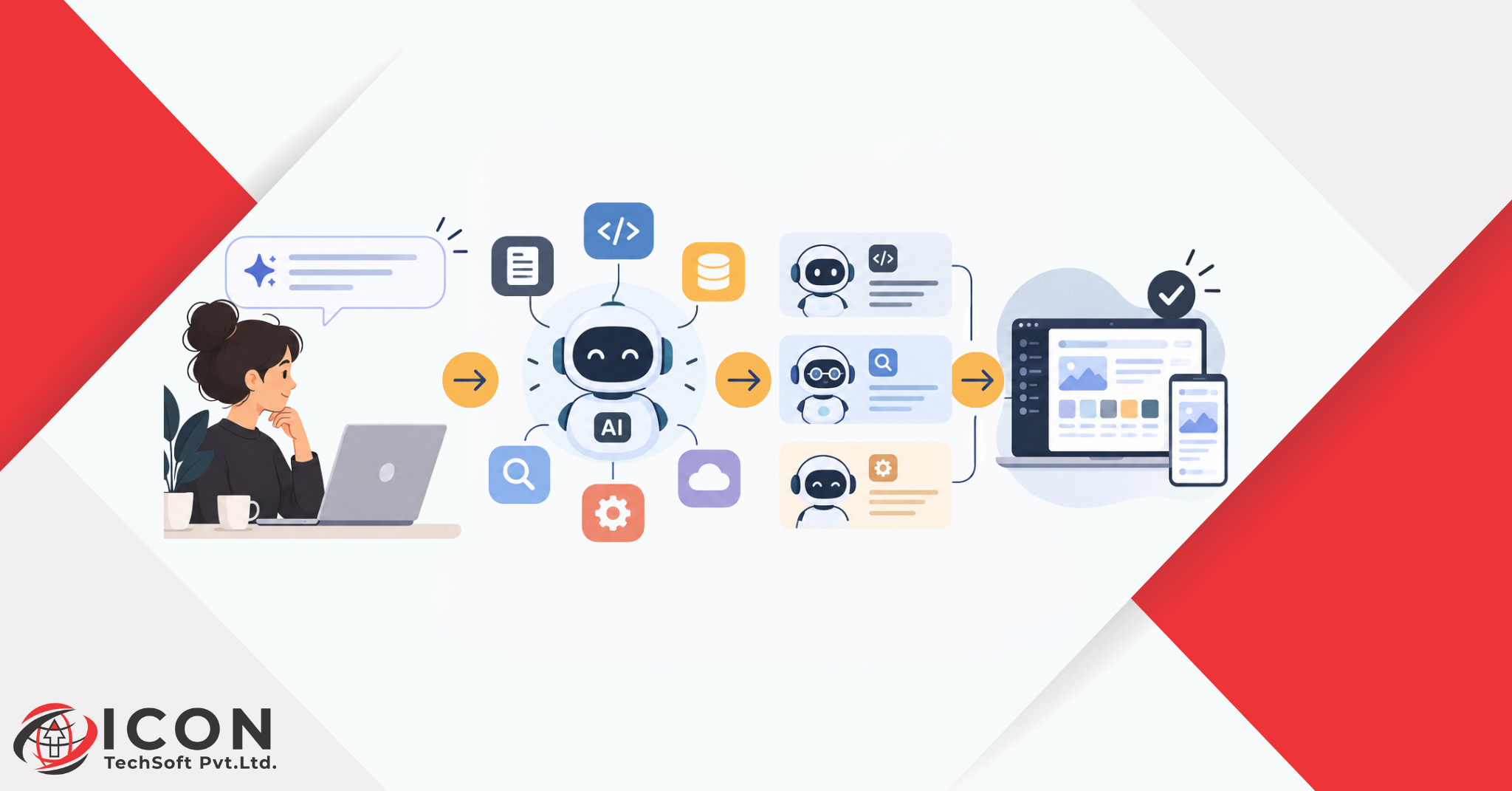
AI for developers work has changed a lot in a short time. Ten years ago, if you wanted software built, someone sat down and typed every line of it. No shortcuts. Today you can describe what you want in a sentence, and something writes the first draft for you. That’s the short version of what AI in software development actually means right now, and it’s already changed how teams plan, build, test, and ship.
It didn’t happen overnight, though it can feel that way, and this whole climb is what people mean when they talk about AI for developers today. First came autocomplete, guessing the next word or two while you typed, an early building block of AI for developers tools. Then AI for developers tools got good enough to write whole functions off a single comment, an early sign of just how far AI code generation was about to go. Now some of them can plan out a task by themselves, write the code, test it, and fix their own screwups without you standing over their shoulder the whole time. Prompt to agent. That’s the arc, and it’s rewriting how software gets made.
For a lot of teams, AI for developers stopped being optional a while back, and AI for developers tools now show up in almost every sprint. It sits next to the code editor and version control now, just another tool you reach for. People use AI for developers support to blow through repetitive tasks, make sense of code someone else wrote years ago, or get an answer without opening ten browser tabs. Small internal tool or big customer-facing product, doesn’t matter, AI in software development shows up somewhere in the process either way.
So this blog is going to walk through what’s actually going on. What AI for developers means in practice, where AI in software development fits into the development lifecycle, which AI programming tools people are actually using, and how AI agents are pushing things past what assistants could do. It also covers the best AI tools for software developers right now and looks at how to use AI for software development without creating new problems along the way. And it won’t skip the messy parts either, because pretending AI has no downsides helps nobody.
AI for developers, put simply, is using AI for developers tools to help build software. Writing code, reviewing it, hunting bugs, drafting docs, sometimes even helping plan the work out. It’s not there to replace developers, and that distinction matters a lot in any honest look at AI for developers adoption. It’s there to take the repetitive, clock-eating parts off their hands so they can spend that time on the harder stuff, and that’s the whole promise of AI for developers in one line.
These tools run on large language models, trained on a huge amount of code and technical writing. Somewhere in that training, they pick up patterns. How bugs usually show up. How code tends to get structured. How documentation is normally written. So when someone types a request, the model leans on those patterns to give back something useful, could be a snippet of code, a fix, or a plain explanation of what’s going wrong. That back-and-forth is the daily reality of AI for developers. That’s really the engine behind AI in software development today.
It’s not just coding, even though that’s the part everyone talks about when they mention AI for developers. Teams use AI for developers during planning to break a big, vague task into something manageable. They lean on AI for developers support while coding to get through the boring bits faster, often through straightforward AI code generation. During testing it can spit out test cases. During review it helps catch problems before they reach anyone. And even after launch, it’s useful for monitoring and keeping docs from going stale.
Old-school development means everything runs through a person, typing, checking, fixing, over and over, which is exactly the gap AI for developers tools were built to close. AI-assisted development keeps a person in charge but adds a partner in the passenger seat who can draft things and automate the dull parts. The developer’s still calling the shots. They’re just not retyping boilerplate for the hundredth time, thanks to AI in software development doing the first pass.
Speed, mostly, and that alone explains most of the pull toward AI for developers adoption. Work that took hours can take minutes now. There’s also a real safety net inside AI for developers tools for developers stepping into an unfamiliar language or framework, since these tools can explain code on the spot and suggest a way forward. Teams save time on docs, tests, review, all of it, which means shipping faster without secretly cutting corners. This is where the real benefits of AI for developers start to show up in the numbers.
Software development isn’t one task, it’s a whole chain of them, from the first idea to the day it goes live. AI in software development has worked its way into almost every link in that chain.
AI for developers starts well before the first line of code. Before anyone writes a line, somebody has to figure out what’s actually being built, and even this planning stage now touches AI for developers workflows. AI for developers can help turn a rough idea or a client’s half-formed request into something closer to a real requirement. It’s also decent at estimating effort and pointing out the gaps nobody noticed, another everyday use of AI for developers teams.
This is usually the first place people notice AI for developers in their day. Type a short comment, get back working code, maybe a single function, maybe most of a page in a web app, a core part of everyday AI for developers use. That’s AI code generation in action, and it saves the kind of time that used to disappear into routine, boring work.
This is AI for developers support at its most practical: debugging used to mean staring at logs for an hour, hoping something jumps out at you. Now these AI programming tools can scan code, point toward what’s likely causing the error, and suggest a fix. They’ll generate test cases on their own too, which catches problems before users ever hit them.
AI for developers earns its keep here too. Nobody likes writing documentation, and this is another place where AI for developers support quietly helps. Everyone agrees it matters, almost nobody has time for it. AI for developers tools can generate a clear explanation of what a piece of code actually does, which saves whoever joins the project six months later. During review it flags inconsistent formatting or security issues that a tired reviewer might just scroll past at 6pm.
Shipping isn’t the finish line, and this is another area where AI for developers support keeps paying off long after launch. AI tools help watch live systems, flag anything weird, sometimes suggest fixes for problems that show up in production. Takes pressure off the team and keeps things stable well after launch day is over, another quiet way AI in software development pays for itself.
Generative AI for developers support is the engine behind basically every coding tool out there right now. Generative because it’s making something new, whether that’s a function, a file, or a suggestion for how a whole project should be structured.
AI for developers relies on this training step. This is the foundation of AI for developers tools. These models train on a massive pile of publicly available code and technical text. From that, they learn common patterns, coding styles, and ways of structuring logic. Give one an instruction and it produces code shaped around what was actually asked for. This is generative AI for developers work doing what it does best, turning intent into working code.
Usually it starts with a plain-English line, the simplest entry point into AI for developers workflows. A developer writes something like “a function that validates an email address,” and the model reads that, figures out the intent, and generates matching code. This is honestly one of the bigger shifts in AI for developers, nobody’s typing every line from a blank screen anymore.
Under the hood, AI code generation works by predicting the most likely next piece of code based on the prompt and whatever’s already in the project. A bit like predictive text on your phone, except far more advanced, since it actually understands syntax, logic, and patterns across a bunch of languages at once.
Output quality tracks pretty closely with how the prompt was written, and this is one of the first lessons anyone learns about AI for developers prompting. Vague prompt, vague result. Specific prompt, better result. Naming the language, the expected input and output, and any constraints gets AI code generation closer to what you actually needed, and means less cleanup afterward.
It’s not perfect. Sometimes there’s a small bug hiding in there. Sometimes it leans on a method that’s outdated. Sometimes it just misreads what you wanted entirely. And sometimes the code runs fine but isn’t the most secure or efficient way to solve the problem. Which is exactly why a human still needs to look it over, even with the best generative AI for developers on the market.
There’s a lot of AI for developers tools floating around now, and each one usually leans into a different part of the process.
These AI for developers tools suggest code as you type, finishing a line or a whole function based on what’s around it. Saves time on repetitive code and keeps you in a rhythm instead of constantly pausing to look something up.
A lot of code editors now ship with a built-in AI for developers assistant that actually understands the whole codebase, not just whatever file happens to be open. Better suggestions, easier navigating through a messy, sprawling project.
Some AI for developers tools scan for likely bugs before the code even runs, flagging unused variables, shaky logic, security gaps. And when something breaks anyway, they’ll often point straight at the probable cause instead of leaving you to dig.
Writing tests and docs matters, but it’s the first thing dropped when a deadline gets close, which is where AI for developers tooling quietly earns its keep. AI for developers can generate basic test cases on its own and pull documentation straight out of the code, so projects stay in decent shape without extra manual grind.
Honestly, the best AI for developers tools are the ones that just fit into a workflow that already exists. Maybe that’s an assistant built into the editor. Maybe it’s a separate tool just for testing. Maybe it’s a chat-based assistant for quick questions. Depends on team size, how complex the project is, and where time is actually getting lost. Most lists of the best AI tools for software developers change every few months, so the workflow fit matters more than the brand name.
A decent way to pick the right AI programming tools, and figure out how to use AI for software development well, is to look at where the biggest time drain already sits. Testing eating the week? Start there. Team keeps bouncing between codebases nobody fully understands? Look for a tool that explains code well. Match the tool to the actual pain point, not whatever’s trending on social media this month.
AI coding assistants changed how a single task gets done. AI agents are changing something bigger, how a whole project comes together.
This is one of the newer branches of AI for developers tools. An AI agent plans out and carries through a series of steps mostly on its own, without needing constant instruction at every turn. Instead of answering one prompt and stopping, it can break a bigger goal into smaller pieces, work through each one, check its own progress, and keep going, a real step forward for AI for developers workflows.
Within AI for developers systems, an assistant handles one request at a time. You ask, it answers, done. An agent works differently, give it a broader goal, like building a small feature, and it can handle the planning, the coding, the testing, and the fixing needed to get there, often across several steps with barely any hand-holding. This is one of the more visible shifts inside AI in software development right now.
Generally an agent pairs a language model with the ability to actually do things, run code, read files, search for information. So it’s not just suggesting an answer anymore. It’s carrying the task out and checking whether the result actually works, adjusting when something fails.
Going from prompts to agents is a bit like going from asking for help on one step to asking for help with the whole outcome. Instead of requesting a single function, you might ask an agent to build the whole feature, and it handles the smaller steps to get there on its own, well beyond basic AI for developers code generation.
Here’s why this matters: it changes what developers spend their day actually doing. Rather than handling every small task by hand, they can set the goal, step back, and review what comes out. More room for the decisions that genuinely need a human brain behind them, and a clear sign of where AI for developers work is headed next.
Agents are showing up across nearly every corner of software development now, not just the coding part.
This is AI for developers at its most hands-off. A coding agent can take something like “build this feature” and run with it start to finish, following whatever requirements were laid out. Writes the code, runs it, checks the result, adjusts if it’s not quite right, essentially handling AI for developers code generation and quality control in one pass.
Rather than just suggesting a fix, an agent can find the bug, apply the fix, run the tests, and actually confirm the problem’s gone. That closes the loop in a way older tools never did, because the agent checks its own work instead of just handing something over and disappearing.
They also get used to dig through unfamiliar libraries, summarize dense technical docs, or keep a project’s internal documentation current as the code changes underneath it, cutting a lot of the manual upkeep that usually just gets skipped.
On the DevOps side, agents can help manage deployment pipelines, watch for issues after a release, and in some setups respond to certain problems automatically. Shortens the gap between something going wrong and someone catching it.
Even with all that automation running, people still matter most. They set the goals, review what comes back, make the calls that actually shape where a project goes. Agents handle the execution. The judgment still comes from a person, which is really the whole point of AI for developers support being AI-assisted, not AI-replaced.
Getting real value out of AI for developers tools takes more than flipping a switch. It takes some actual thought about how to use AI for software development in a way that actually holds up.
Effective AI for developers use starts with knowing what to hand off. Not everything’s a good fit. Repetitive, well-defined tasks, boilerplate code, generating tests, that kind of thing, tend to work well for AI for developers, and they’re usually the first place teams see how to use AI for software development pay off. Anything needing deep business context or a tricky judgment call still usually needs a person making the final decision.
Clear prompt, better result, and this is basic AI for developers practice at this point. Say what you actually want, mention constraints, give a bit of context, and AI code generation lands a lot closer to what’s needed. Saves time fixing things after the fact.
This is non-negotiable in AI for developers work. Nothing AI writes should go straight into production untouched. Check it’s correct, check for security holes, check it actually matches the standards the rest of the project already follows. This step is non-negotiable in any serious approach to how to use AI for software development.
The strongest results come from pairing the speed of AI for developers tools with what a human already knows, the business, the users, where the project’s actually headed. AI can’t fully grasp any of that on its own, not yet anyway, which is really the core idea behind AI for developers in the first place.
AI-generated code deserves the exact same scrutiny as anything a person writes. Same tests, same review, same security checks, exactly the discipline any serious AI for developers workflow needs. No shortcuts just because a machine wrote the first draft.
The rise of AI for developers has brought some genuinely practical wins, and not just for big teams either.
Add it all up over a year or two, and teams get the full benefits of AI for developers adoption without constantly needing to hire their way out of the backlog.
None of this comes free, and anyone serious about AI for developers should go in with eyes open. AI-assisted development carries real risks that teams need to actually keep an eye on, not just acknowledge once and forget.
This is one of the real risks inside AI for developers. This is a real limit of AI for developers tools worth repeating. AI models can sound completely confident while being flat wrong. Usually called hallucination, and it means nobody should trust a suggestion blindly without checking it against reality first, no matter how advanced the AI programming tools involved.
AI-generated code can carry security weaknesses, sometimes because the model picked up similar habits during training, a real caveat of AI for developers tooling. Security review doesn’t get to skip a step just because AI wrote most of it.
Code that runs isn’t automatically code that’s pleasant to live with later, something every AI for developers workflow has to watch for. AI-generated code can end up inconsistent in style, or more tangled than it needs to be, and that becomes someone else’s headache down the line.
Using AI for developers often means sending code or business logic somewhere outside your own systems. Worth thinking hard about what’s actually being shared, especially anything sensitive or proprietary.
Lean on AI in software development too hard without understanding what it’s actually producing, and it slows down your own learning. Makes it harder to fix things later when the AI gets something wrong and you don’t know why. Balance matters here.
Human oversight is still the biggest safeguard against all of it, no matter how mature AI for developers technology gets. AI can carry a lot of the weight, but the final responsibility for quality and safety stays with the people who built the thing.
AI for developers is still moving fast, and what’s happened so far is probably just the warm-up.
The next chapter of AI for developers is already taking shape. Early tools acted like copilots, suggesting things while a developer stayed fully in charge, the first real generation of AI for developers products. The next stage looks like more autonomous agents handling bigger, multi-step work with less hand-holding, while people stay involved in the decisions that actually count.
Whole workflows, planning through deployment, will probably lean on AI for developers tools more over time. That’s not about cutting developers out. It’s about giving them tools that handle more execution so they can focus on direction and quality.
As AI for developers takes on more of the hands-on coding, a developer’s role tilts toward reviewing, guiding, and deciding what to do with what comes back. Communication, system design, and critical thinking start mattering just as much as writing code did before.
Developers who know how to work well with AI for developers tools, write a clear prompt, and actually judge the output critically will be in a strong spot. Solid fundamentals in programming logic and system design still matter just as much, maybe more, even as the tools around them keep shifting.
Smaller teams pulling off bigger, more ambitious products, backed by agents handling a lot of the repetitive grind, that’s roughly where AI for developers technology seems to be heading. Development cycles shrink. The gap between an idea and something people can actually use keeps closing, which is exactly the direction AI for developers has been pointing all along.
How is AI changing the software development lifecycle?
AI in software development touches almost every stage now, planning, coding, testing, documentation, deployment, helping teams move faster while cutting down repetitive manual work along the way.
How accurate and reliable is AI-generated code for production applications?
Genuinely useful, but not always spot-on, a fair summary of where AI for developers tools stand right now. It needs review and testing before it goes anywhere near production, same as code any person writes.
Which software development tasks can AI agents automate?
Writing and testing code, fixing bugs, generating documentation, handling pieces of deployment, mostly work that’s repetitive and reasonably well-defined. A lot of this overlaps directly with everyday AI code generation.
How can developers integrate AI coding tools into existing workflows?
Start small, lower-risk tasks first, then expand as the team gets comfortable actually trusting and reviewing what comes out. That’s usually the safest answer to how to use AI for software development without disrupting a working process.
What are the biggest security risks of AI-generated code?
Hidden vulnerabilities, outdated practices baked into suggestions, and accidentally exposing sensitive information. All reasons security review can’t get skipped, even with reliable AI programming tools in the mix.
How do AI agents differ from traditional AI coding assistants?
Assistants answer one request at a time, the simplest form of AI for developers support. Agents plan and complete multi-step tasks on their own, checking their own progress as they go along.
Will AI agents eventually automate end-to-end software development?
They’ll probably take on more execution over time, but people are still needed to set direction, make judgment calls, and keep the software tied to what the business actually needs.
What skills will software developers need as AI becomes more autonomous?
System design, clear communication, critical thinking, and the ability to review and steer AI output well, all core to working with AI for developers tools long term. All of that gets more valuable, not less, as AI for developers takes on more hands-on coding.
Going from a single prompt to something closer to a real AI agent shows how fast AI for developers technology has actually moved. What started as basic code suggestions turned into tools that can plan, build, test, and refine software with a fraction of the manual effort developers used to put in.
Even so, developers are still at the center of AI for developers and always will be. AI for developers works best as a partner, not a stand-in. It takes the repetitive, time-eating parts off the plate so developers can spend that energy on design, strategy, and the calls that genuinely need a human behind them.
As these AI for developers tools keep getting sharper, the teams that understand how to use AI for developers support thoughtfully, clear prompts, careful review, real oversight, are the ones who’ll end up building smarter, faster, more reliable software in the years ahead.